Updates and Version Compatibility
Consult the Release Notes for supported update paths. For a fresh deployment, use the Installation Instructions. Development builds are not a supported update source.
| Screenshots show the Management frontend with simulated example data. Versions, hostnames, timestamps and status observations do not describe a deployed appliance. |
Update Targets
| Target | Delivery | Effect |
|---|---|---|
Management ISO host |
Management ISO |
A qualified newer ISO updates the host while retaining the state disk and any persistently selected Management image. |
Management application on the ISO host |
Qualified image included in the selected release or update bundle |
Management prepares the exact required version and build ID before the Appliance operation. |
Management on an operator-maintained container host |
Management image |
Recreate the container with the qualified image, retaining its |
Installed Appliance |
Update bundle for the target release |
An eligible installed source updates through Appliance > Update. A release bundle for fresh installation cannot serve as an update bundle. |
Replacing Management media or its image does not itself update the managed Appliance. An Appliance update does not replace Management’s boot ISO.
For offline transfer, use Export Bundle Archives to save the published update image for browser upload. Its tag normally names the target version. There is one update bundle per target release. Check its minimum source version and the supported update paths in the release instructions.
Before an Update
Use the target release’s instructions and compatibility information. Retain a complete recovery set outside the appliance and plan the required maintenance window. Keep Management connected and retain the local bundles required by the operation.
Update the Management ISO
Have hypervisor console access before updating from an earlier ISO with factory SSH access.
If that host has a saved authorized_keys file, inspect it from an approved root maintenance session before replacing the ISO:
saved_keys=/var/mnt/mtg-manager-state/persistent/host/ssh/authorized_keys
wc -lc "$saved_keys"
awk 'NF { printf "Key %d: %d characters%s\n", ++keys, length($0), /\r/ ? " (CR)" : "" }' "$saved_keys"
The first command reports the file’s total line and byte counts. The second reports each nonblank key entry’s length and marks carriage returns with CR.
Saved public keys must have no carriage returns, at most 64 entries and at most 4096 characters per line.
The converted access policy record must fit within 64 KiB, including its JSON structure.
Contact MTG before updating if saved keys exceed these limits, the file is near 64 KiB, or you cannot inspect it.
Agree any required key repair with MTG; older ISOs have no ordinary console workflow for this migration.
Finish current work and shut down Management cleanly. Replace the attached ISO with a qualified newer ISO, then reboot with the same state disk. Check the host and Management versions after boot. An existing persistent Management image selection takes precedence over the new ISO’s embedded image. Updating the ISO alone does not replace that selection. Do not switch back to older media as a recovery procedure after a failed forward update. If incompatible keys stop state preparation, preserve the read-only disk, collect console recovery status and contact MTG. Do not erase state or edit it through an unsupported repair procedure.
The transition to the new access controls disables SSH and removes the legacy host password. It preserves machine identity, SSH host keys, saved public keys and Management data. At the console, configure a new host password or use the preserved public keys, then choose the authentication method and explicitly enable SSH if needed. This state-format migration is one-way; older ISOs reject the migrated state.
After that transition, subsequent supported ISO updates preserve your explicit SSH settings and credentials. Verify the configured access policy after each update before returning Management to production use.
Management Image Selection
On first use, the ISO runs its embedded Management image. After a supported bundle-driven image replacement, the host persistently selects the validated image on the state disk. That selection survives reboots and ISO replacement and takes precedence over the ISO’s embedded image.
If the selected archive is missing, invalid or fails to start, Management stops. The host does not automatically fall back to the embedded image or an older selection. Preserve the state disk and inspect the console and host service logs before contacting support. Replacing the ISO or editing selection records is not a rollback procedure.
For Docker or Compose, follow Replace the Management image. Retain the same persistent volume and TLS material.
Update the installed appliance
Before starting, check and renew cluster access. With two hours or less remaining, Management requires explicit acceptance of the expiry risk. Expiry or eviction cancels the update work that depends on the access lease. Reconnect, then use the update’s explicit Retry when offered; reconnection does not resume the update automatically.
-
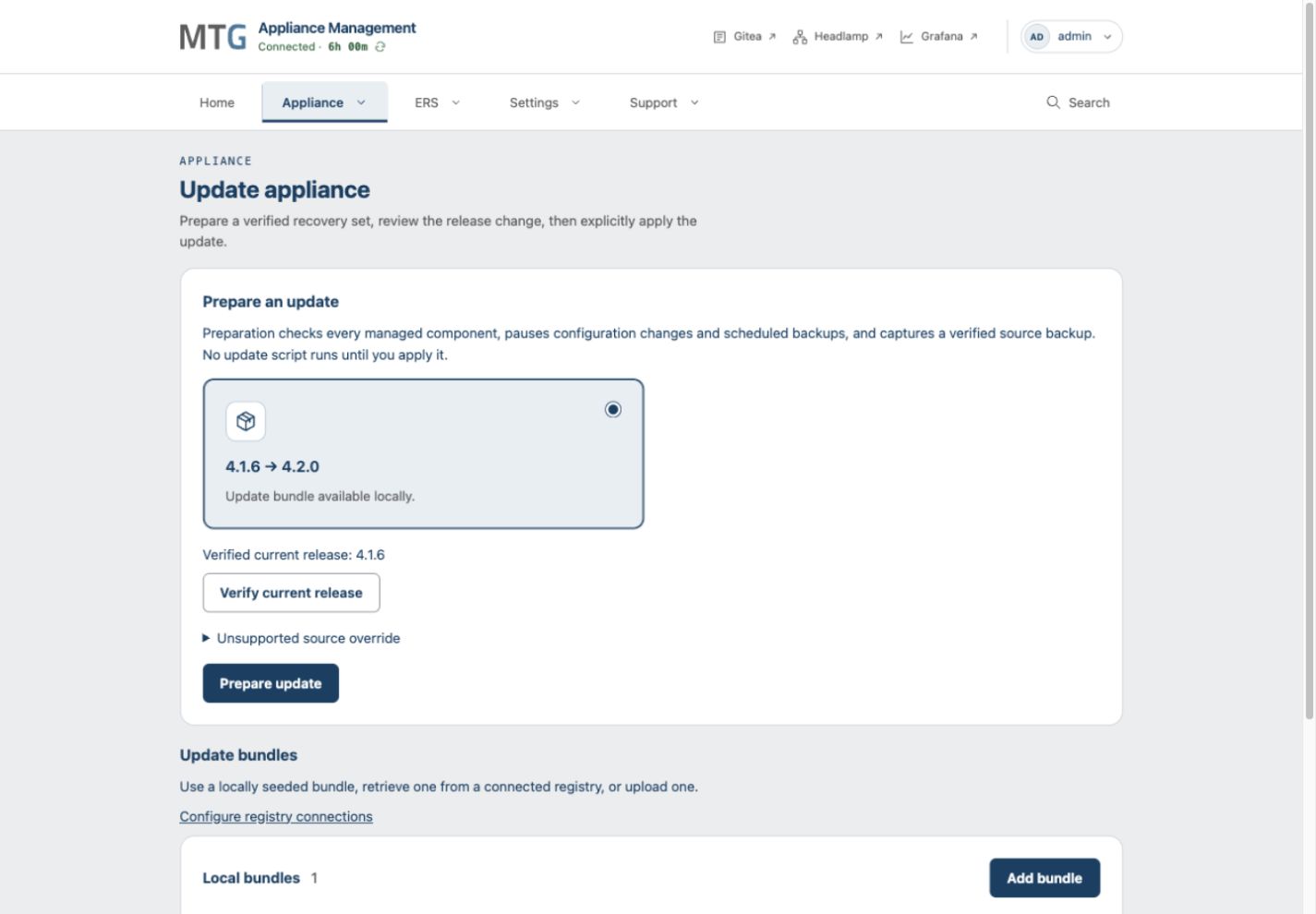
Open Appliance > Update and select the update bundle for the target release. Verify that the installed source is within its declared range and the release instructions support this path.
-
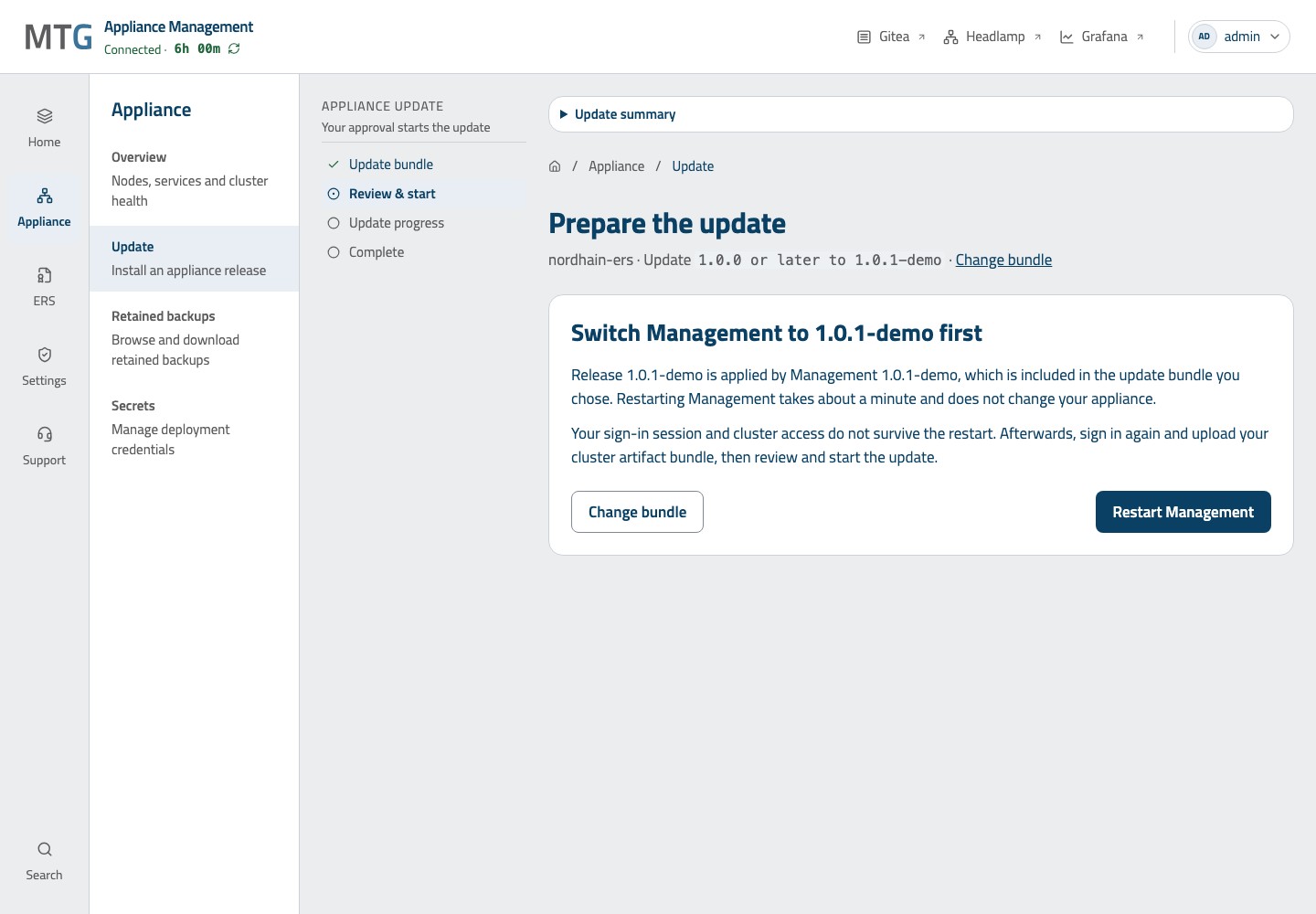
Choose Continue with the selected target version. Management checks its exact version and build ID against the bundle. If a Management replacement is required on a supported ISO host, finish other active work, retain required downloads and select Restart Management. The Appliance update has not started.
-
After the restart, sign in again and upload the cluster artifact bundle to restore access. The selected update is retained, but the sign-in session and cluster access are lost. For unsupported hosts or a different build at the same or an older version, follow Management preparation.
-
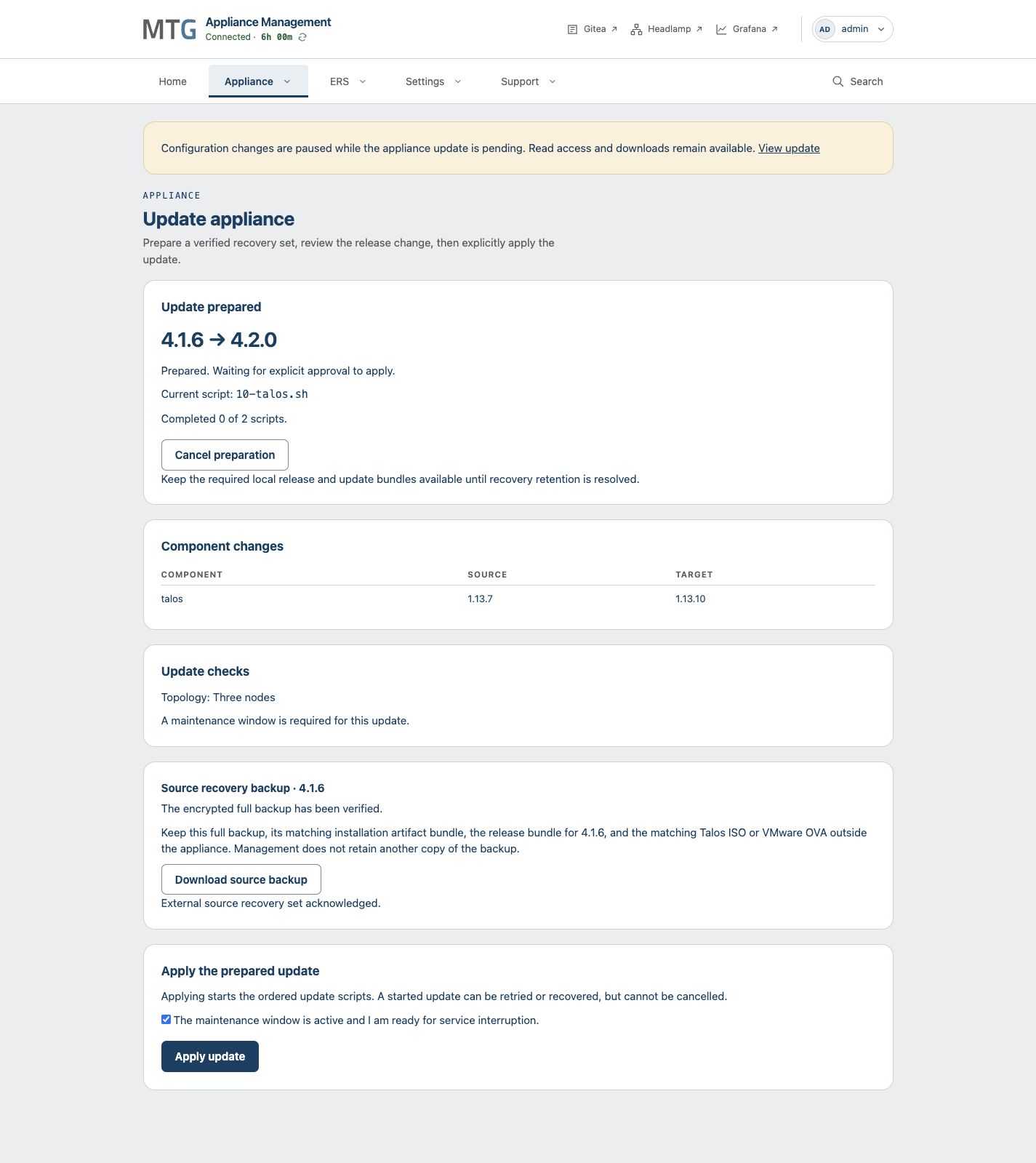
Review the installed source, target release and maintenance requirement. Confirm the maintenance window when required, then select Start update.
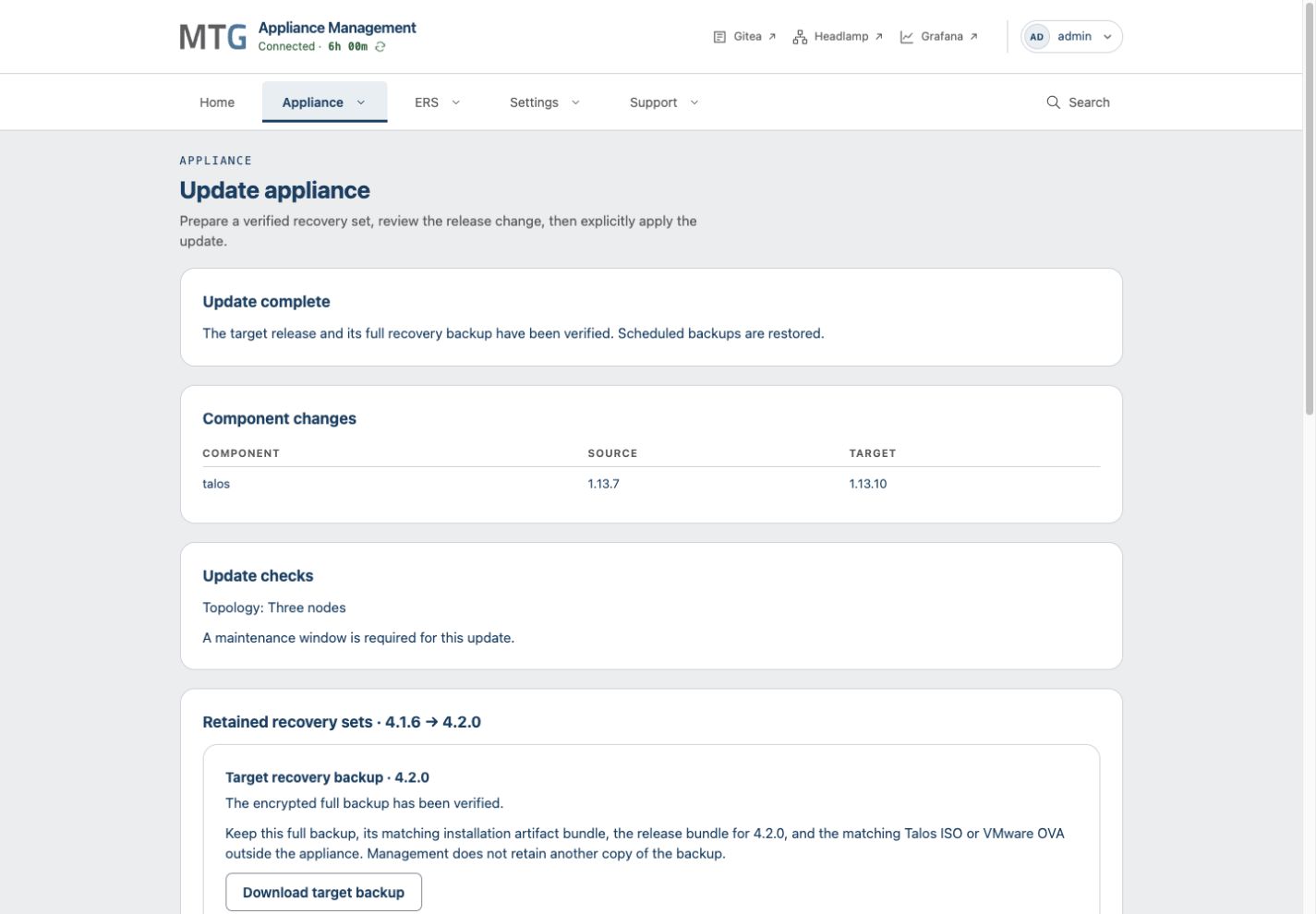
Management checks the appliance, captures and verifies a pre-update backup, runs the update scripts, and verifies the target release and its new full backup. Configuration editing pauses when Start is accepted; scheduled backups pause before the source backup. Both resume when the update finishes.
You can cancel until the first update script starts. After scripts start, a stopped update requires an explicit retry or recovery. Download the pre-update and post-update backups. Keep each with its matching artifact bundle and release bundle as a complete recovery set.
Use these mechanisms only for a source-to-target path documented in the release instructions. The Unsupported source override control does not create a supported path.
Attending to an Update
Keep the exact source and target version, displayed phase, error and retained recovery set. Use the UI’s reconnection link if access expired.
If Management preparation is rejected, correct the displayed host problem before retrying. If the restart has not completed after five minutes, inspect the host Management service and logs. Automatic rollback is not available; the Appliance update has not started at this point.
Before replacing media or attempting a different update bundle, collect diagnostics and contact support.