Security and hardening
The Appliance combines Talos Linux, Kubernetes, networking, storage, and application services into one managed product. Management provides installation, configuration, updates, and recovery for the supported one-node and three-node layouts.
Use this guide to secure your deployment and assess Appliance nodes against the CIS Talos benchmark. Assess the hypervisor, Management host, administrator workstations, customer network, and application security separately. KMS application workloads are outside this guide’s scope.
Management, Appliance nodes and ERS applications have separate administrative interfaces. A person with Management administrator access, cluster credentials or hypervisor control has extensive authority over the deployment. Restrict access to these administrative systems.
Customer responsibilities
| Area | Recommended action |
|---|---|
Administrative access |
Restrict Management, hypervisor, and node administration to authorized personnel and networks. Use trusted HTTPS certificates and protect administrator accounts. |
Virtual machines and hosts |
Maintain supported firmware, Secure Boot, and TPM settings. Keep the hypervisor and Management host patched and protect their storage. |
Management runtime |
Keep the supported container security and storage settings. Treat browser terminals and container administration as privileged Appliance access. |
Credentials and backups |
Protect access credentials, installation artifacts, recovery keys, and backups. Keep private keys and secrets out of assessment reports. |
Network and time services |
Provide reachable DNS and NTP services. Use at least two time servers to meet CIS control 2.1, and restrict network access to required connections. |
External logging |
For either Appliance layout, enable verified TLS export to a customer log server. Set retention and access policies appropriate to your organization. |
Compliance assessment |
Assess the installed release, customer settings, and documented deviations against your security policy. Follow the CIS Talos benchmark chapter for individual control outcomes. |
Built-in protections
| Protection | What the Appliance provides | Limits |
|---|---|---|
Minimal node operating system |
Talos nodes have no SSH server, interactive host shell or package manager. Normal administration uses the Talos API and declared machine configuration. |
This applies to Appliance nodes. The Fedora CoreOS Management host has a separate root SSH interface. See Talos OS hardening. |
Verified node boot and encrypted volumes |
Appliance nodes use signed Talos boot media, Secure Boot, and TPM-protected encryption for system state and Appliance data volumes. |
Retain the required virtual firmware and TPM settings. Protect the Management host and exported backups separately. See Secure Boot and disk encryption. |
Authenticated Management operations |
Management requires administrator sign-in for operations and administrative tools. Browser access uses HTTPS with supplied-certificate and ACME options. |
Administrator access is broad. The initial self-signed certificate needs an explicit trust decision or replacement; HTTPS alone does not establish the server’s identity. |
Temporary cluster access in Management |
Management retains the uploaded artifact bundle in memory for six hours. Node firewall openings expire with the access lease. Management also removes its retained bundle and checks firewall closure. Appliance workloads continue running. |
Keep administrative endpoints restricted to approved sources through your network firewall. Expiry does not revoke credentials in downloaded bundles. If host loss or node unreachability prevents confirmation of closure, follow the unconfirmed-closure procedure. |
Encrypted configuration secrets |
Managed configuration secrets are encrypted in the configuration repository and decrypted when applied to the Appliance. |
Authorized administrators and running workloads can access required plaintext. Repository encryption does not encrypt every disk, database, log or clipboard. |
Protected backup content |
Backup content is encrypted before storage. Recovery requires the private key retained in the installation artifact bundle. |
Protect backups and artifact bundles. Backup inventory remains visible, and access to both backups and recovery keys can expose sensitive data. |
Cluster networking controls |
Talos blocks incoming node connections by default, with explicit allowances for required services. Cilium controls outgoing node traffic and applies default-deny workload policies with service-specific allowances. WireGuard and service TLS protect the covered traffic paths. |
Required service allowances and trusted node access remain. Management host traffic and external interfaces need their own protections. See the firewall policy and traffic encryption coverage. |
Workload restrictions |
Restricted Pod Security policy applies to ordinary Appliance workloads. Admission controls bound the additional access needed by networking, local storage, and node monitoring. |
Infrastructure exceptions retain broader node access. See Pod Security restrictions. Management runs its services in one container with a read-only root and persistent |
Controlled configuration publication |
Management records supported configuration changes in Git and publishes them to the Appliance. Use the supported configuration workflows for permanent changes. |
Repository history and artifact digests do not replace access control, review or an independent audit archive. |
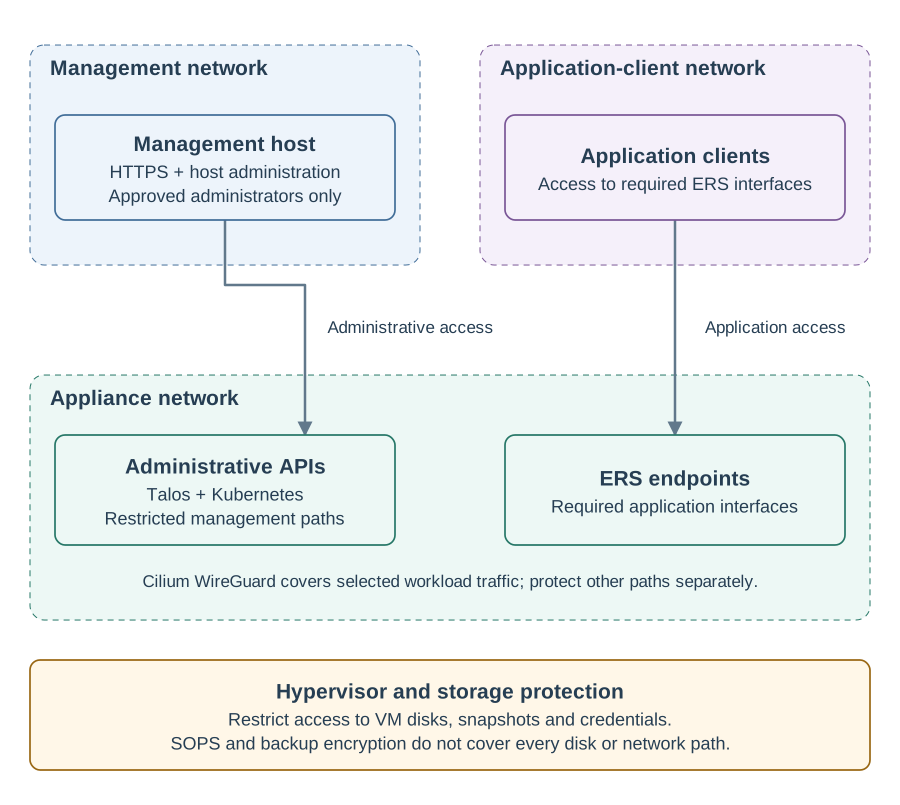
Isolate administrative access
-
Place Management on a dedicated management network. Permit its HTTPS interface only from approved administrator workstations or an organization’s controlled remote-access service.
-
Restrict Management host SSH to approved maintenance sources. Keep it blocked from application-client networks and the Internet, including during initial boot.
-
Allow Talos and Kubernetes administrative APIs only along the required management paths. Expose ERS application interfaces to their intended clients without exposing internal database, registry or monitoring services with them.
-
Allow external DNS, time, HSM, backup, registry and monitoring connections according to the deployment plan. Test both allowed access and rejected access from an unauthorized network.
Use Firewall requirements for the documented Management, application and node-to-node connections. Add the flows required by your configured integrations and verify installation, normal operations and recovery with the planned network rules. Agree any additional restrictions with MTG.
Protect a Docker host
For container deployments, protect access to the host and container engine as administrator access to Management.
Keep the host and runtime patched, restrict published ports and protect the /var volume, TLS directory and Docker Compose settings.
Container privilege does not isolate Management secrets from host administrators.
Configure storage encryption through the host or storage platform if your policy requires it.
The ISO’s console and host SSH controls below apply only to ISO hosts. They do not configure or harden an operator-created host.
Protect the ISO host’s SSH access
The Management ISO defaults to SSH disabled and has no factory host password. Enable root SSH only when needed, using Host access at the hypervisor console or explicit unattended initialization settings. The Management browser administrator password is separate and never grants host SSH access.
-
Restrict TCP
22to approved maintenance sources and retain hypervisor console access. Keep SSH blocked from application-client networks and the Internet. -
Root SSH grants privileged maintenance access. If your policy prohibits it, keep SSH disabled and use the console. Otherwise, follow Configure Management host SSH access to set customer-controlled credentials, select the authentication method and enable SSH. Adding a key or rotating a password does not enable SSH or change the selected method.
-
After initialization, reboot and verify that the intended access policy persists. Check approved access, rejection of unselected methods and isolation from unauthorized networks before production handover.
For earlier ISOs with the factory credential, follow the SSH migration guidance when moving to an ISO with these controls.
Keep network restrictions in place while a cluster access lease is active. The Appliance opens authenticated Kubernetes and registry access to routable IPv4 sources permitted by the network, not just the Management host. Follow renewal, eviction and unconfirmed-closure guidance before assuming access has ended.
Establish trust and limit administrator access
-
Use a certificate trusted by administrator workstations for the Management hostname. Choose supplied certificates or ACME as described in Management certificates. Track expiry and verify the hostname and chain after replacement.
-
Provision named administrator accounts through the organization’s Gitea process. Grant administrator status only to people who need Appliance control and review access when responsibilities change.
-
Protect the initial credentials and replace application bootstrap credentials using the relevant product’s supported procedure. Manage ERS users separately from Management users.
-
Use the organization’s protected administrative workstations and remote-access controls. If your policy requires multifactor authentication, enforce it at the identity or access service and test the operator sign-in process.
-
Sign out after work and close administrative tool tabs. Remove obsolete accounts and review retained cluster artifacts when somebody leaves the administration team.
See Manage access for the differences between Management, cluster and ERS accounts. Headlamp and Grafana use shared administrative access behind Management; they do not provide an independent per-user Kubernetes audit identity. A copied artifact bundle remains sensitive after the browser session ends. Coordinate credential replacement with MTG if that bundle is exposed.
Protect disks, credentials, and recovery material
The Management state disk contains host keys, application credentials and TLS material. The ISO does not encrypt that state disk. Talos node state and Appliance data volumes use TPM-protected encryption as described in the disk-encryption control. Configuration encryption and encrypted backups protect their respective content separately.
Restrict who can read, copy, snapshot, export or attach the Management and Appliance disks. Apply the organization’s storage encryption and key-management controls at the hypervisor or storage layer as required by that policy. Include VM exports, snapshots and decommissioned media in that policy and verify that recovery operators can obtain the necessary storage keys during an outage.
Store downloaded artifact bundles in controlled recovery storage. Keep them available after loss of Management but avoid leaving copies in browser download folders or shared directories. Retain completed full backups outside the Appliance, preferably with independently administered retention or immutability controls. Test a restoration using the full recovery set in an isolated environment. See Configure and retain backups.
For deployments using an HSM, protect its administrator credentials and establish the vendor’s key backup and recovery process. Appliance backups do not recover external HSM keys. Use the HSM guide for supported integration steps and limits.
Keep monitoring useful and private
Keep customer metrics access disabled unless it is needed. When enabling it, choose mTLS or Basic authentication over trusted HTTPS according to the monitoring system’s capabilities and restrict the source network. Verify rejected access as well as a successful scrape. Follow Customer monitoring and Syslog when replacing an access policy.
For both Appliance layouts, export kernel and service logs to a customer log server using TLS with receiver certificate and hostname verification. Configure client certificates if the receiver requires them, and protect its retention and access settings. External export is recommended; installations without it remain supported. Audit records can contain sensitive original payloads. Review who can search or export them, verify receipt at the destination and assign responsibility for responding to alerts. See remote logging for the compliance conditions and collection limits.
Local telemetry is excluded from Appliance backups. The log pipeline does not collect the Kubernetes API server audit file and dashboard audit viewers do not verify record signatures. If your policy requires complete or independently verifiable audit evidence, agree the collection and verification process before accepting the deployment. See Inspect health, logs and audits.
Maintain the supplied software baseline
Obtain Appliance media and bundles through the agreed MTG distribution channel. Verify supplied checksums and retain the release identity with your deployment records. A checksum checks content integrity; its trust depends on how you obtained the expected value.
Review security advisories and schedule supported Appliance and Management updates. Use the release’s compatibility instructions and prepare recovery material before maintenance. Avoid individually upgrading embedded components or applying arbitrary upstream hardening scripts to the running system; changes must remain compatible with the Appliance configuration and recovery process.
The Appliance’s update policy covers Talos, Kubernetes, networking, storage, monitoring, Management, application dependencies, and helper tools. Component reviews take place before each release, at least monthly, and when relevant security advisories appear. Updates are tested together to preserve compatibility across the Appliance. When an update needs to wait for compatible dependencies, the review records the reason and sets a review date within 30 days. See control 1.3 for Talos and Kubernetes update guidance.
Use supported Appliance releases and include Appliance updates in your maintenance process. Consult release notes and component records, and follow the update procedure.
Check security before production use
Before using the Appliance in production, complete these checks and record the results:
-
Test that unauthorized networks cannot reach administrative interfaces, including Management host SSH.
-
For Management ISO installations, keep host SSH disabled unless needed for maintenance. If enabled, verify the configured login methods and network restrictions after a reboot.
-
Confirm that only approved users have administrator access and that administrator workstations trust the Management HTTPS certificate.
-
Restrict access to secrets, VM disks, snapshots, and artifact bundles to authorized personnel.
-
Store a completed full backup outside the Appliance. Test the recovery procedure in an isolated environment with all required recovery material.
-
Verify that configured monitoring and log destinations receive data and that you can retrieve the records required by your policy.
-
Document who handles software updates, security incidents, and exposed credentials, and which procedures they follow.
Repeat the relevant checks after changes to networking, identity, certificates or software. Keep support contact details and recovery instructions available outside the Appliance.
CIS Talos Linux Benchmark v2.0.0
About this assessment
This chapter explains how the Appliance addresses all 21 recommendations in CIS Talos Linux Benchmark v2.0.0. It covers Level 1 and Level 2 for both supported Appliance layouts.
Each recommendation states whether the Appliance configuration is compliant, conditional, a documented deviation, or not applicable. Conditional results depend on customer configuration or installed software. These descriptions support assessment of your installation; they are not a CIS certification or a claim of complete benchmark compliance. The documented deviations cover combined node roles, Cilium reverse-path filtering, and the use of WireGuard and service TLS in place of KubeSpan.
1.1.1 Install Talos with SecureBoot enabled
Level 2. Compliant with the required virtual machine settings.
Secure Boot verifies the signed Talos boot software before it runs. The Appliance selects signed installation media and checks boot security during installation and updates.
Keep Secure Boot and TPM2 enabled in each node’s virtual machine settings. Include these settings in your checks after firmware or hypervisor changes.
1.2.1 Encrypt System Disks with KMS or TPM methods
Level 1. Compliant.
The Appliance configures encryption for Talos system state and Appliance data volumes. Each node uses its TPM to protect the encryption keys, with unlocking tied to the configured boot security policy.
Preserve the node’s TPM and firmware settings, and protect the installation artifacts and recovery keys. Apply your organization’s storage protection policy to the Management host and exported backups separately.
1.3 Ensure updated software is installed
Level 1. Conditional on installed software versions.
The Appliance selects and tests Talos, Kubernetes, and Cilium as a compatible combination under the software update policy. This control is met when the installed Talos and Kubernetes versions are current stable releases. If compatibility requirements delay an update, include the documented reason in your installation’s assessment.
Consult the release notes for changes and release-specific compatibility requirements. Use the component and version records to identify your installed release and its software inventory. Follow the update procedure for supported update paths, prerequisites, and installation steps.
2.1 Ensure NTP is configured
Level 1. Conditional on at least two reachable NTP servers and synchronized clocks on every node.
Accurate time supports certificate validation, authentication, and reliable audit records. Installation accepts one to four NTP servers and waits for time synchronization on every node.
Choose independent time sources where available and verify synchronization on every node. One-server installations remain supported but do not meet this control.
3.1 Ensure control plane scheduling is disabled
Level 1. Not compliant. Appliance design deviation.
The Appliance runs its services and the Kubernetes control plane together in a compact one-node or three-node layout. This lets installation, updates, and recovery manage the complete product as one system. Kubernetes is the Appliance’s internal platform for these packaged services.
Both layouts therefore allow application workloads on control-plane nodes. This is an intentional difference from the benchmark’s recommendation for separate worker nodes and does not meet this control. Workload restrictions and resource management support the shared layout; they do not provide separation of the roles onto dedicated nodes. Include this design deviation in deployment acceptance if your policy requires dedicated control-plane nodes.
3.2 Ensure Pod Security Standards policy is restricted
Level 1. Compliant. Restricted default policy with specific infrastructure exceptions.
The cluster’s default enforcement policy is Restricted, meeting this control’s required default. The Appliance applies Kubernetes Restricted Pod Security policy to ordinary workloads, including application, database, backup, and monitoring services. Admission controls also protect namespace security settings against weaker policies.
Essential infrastructure needs selected access to node networking, storage, and system logs. The Appliance limits these exceptions to the packaged components and their required operations:
| Component | Purpose and restrictions |
|---|---|
Networking |
Cilium manages network interfaces and traffic protection. Its exception limits the permitted component identities, processes, and host access. |
Local storage |
The storage provisioner creates and removes Appliance data directories. Its helpers are limited to designated storage locations and fixed operations. |
Node monitoring and logging |
Dedicated collectors read host metrics and system logs. Their exceptions limit the permitted workloads and host access while retaining operational visibility. |
These components remain trusted infrastructure with broader node access than ordinary workloads. Appliance controllers and the backup service also retain the administrative permissions needed for their functions. Include infrastructure exceptions in your organization’s security review.
4.1 Ensure RBAC is enabled
Level 1. Compliant.
Role-based access control governs administrative operations on the Talos and Kubernetes APIs. Each API has its own credentials and permissions.
Provide access only to authorized administrators, protect both sets of credentials, and review their distribution regularly.
5.1.1 Ensure packet redirect sending is disabled
Level 2. Compliant.
Talos disables IPv4 ICMP redirect sending by default, and the Appliance retains that setting.
5.2.1 Ensure source routed packets are not accepted
Level 1. Compliant.
The node configuration disables IPv4 and IPv6 source routing for the global and default settings required by the benchmark.
5.2.2 Ensure ICMP redirects are not accepted
Level 2. Compliant.
The node configuration disables acceptance of IPv4 and IPv6 ICMP redirects.
5.2.3 Ensure secure ICMP redirects are not accepted
Level 2. Compliant.
The node configuration also disables the separate IPv4 setting for redirects from known gateways.
5.2.4 Ensure suspicious (martian) packets are logged
Level 2. Compliant.
The Appliance enables kernel logging for packets with suspicious source or destination addresses. These events use the kernel log collection path. Include their receipt and event volume in your logging checks.
5.2.5 Ensure broadcast ICMP requests are ignored
Level 1. Compliant.
Nodes ignore broadcast ICMP echo requests. This reduces their use in attacks that amplify traffic through broadcast replies.
5.2.6 Ensure bogus ICMP responses are ignored
Level 1. Compliant.
Nodes retain the kernel default that suppresses warnings about bogus ICMP error responses.
5.2.7 Ensure TCP SYN Cookies is enabled
Level 1. Compliant.
TCP SYN cookies help nodes continue accepting legitimate connections when connection requests exhaust the normal queue. The Appliance retains the kernel’s enabled setting.
5.2.8 Enable Reverse Path Filtering if there are only symmetrical routes
Level 2. Not compliant. Cilium compatibility deviation.
The Appliance uses Cilium’s supported routing configuration to maintain Pod, service, and node connectivity. Cilium disables strict reverse-path filtering on its network interfaces and the global IPv4 setting because that filtering can reject legitimate traffic.
The Appliance retains this behavior and records a deviation from the benchmark’s required strict-filtering values. This applies to both layouts. Network access policies remain a separate protection; the kernel’s strict reverse-route source check is not provided. MTG reassesses this deviation when Cilium or the Appliance network design changes.
5.3.1.1 Apply an appropriate control plane firewall policy
Level 2. Compliant.
The Appliance meets this control with a default-deny policy for incoming node connections and explicit allowances for required services. Talos filters incoming node traffic, while Cilium controls outgoing node traffic and traffic between workloads. Workload rules allow the required service identities and ports. Trusted node services retain the local workload access needed for their functions.
Node-to-node services accept traffic from the configured cluster peers and, where required, the Pod network. Outgoing access includes configured DNS, NTP, proxy, and service destinations. Optional integrations need their corresponding network allowances.
External Kubernetes API and node registry access opens through authenticated, time-limited administrative leases. At baseline, those services accept internal cluster traffic. The Talos API remains reachable over IPv4 so an authenticated administrator can manage access; it requires client certificates and role authorization. Application HTTPS access follows a separate policy for the public application endpoint.
Place node administration on a protected management network and permit only the connections required by your deployment. The node firewall openings expire automatically with the lease. Expiry does not revoke credentials or guarantee termination of established connections. If Management cannot confirm closure, follow the unconfirmed-closure procedure.
5.3.2.1 Apply an appropriate worker node firewall policy
Level 2. Not applicable to the supported node roles.
Both Appliance layouts use combined-role control-plane nodes, covered by the control-plane firewall policy. The Appliance has no separate worker-only nodes.
5.4.1 Enable KubeSpan where network level encryption is required
Level 1. Not compliant in the three-node layout. Not applicable to inter-node traffic in the one-node layout.
The Appliance uses Cilium WireGuard and service TLS in place of KubeSpan. This keeps network protection within the Appliance’s existing services and supports offline operation without an additional discovery service.
In the three-node layout, WireGuard encrypts supported Pod traffic between nodes. TLS protects the administrative APIs, control-plane services, registry, and node telemetry connections, with certificate validation appropriate to each service.
These protections cover the named traffic paths rather than every packet between nodes. Host connectivity checks and DNS can remain unencrypted, and same-node traffic stays outside the WireGuard tunnel. Assess these paths separately if your policy requires encryption of all inter-node traffic.
This is an Appliance design deviation from the benchmark’s explicit KubeSpan recommendation, with alternative protection for the covered flows. Complete equivalence to KubeSpan is not claimed. For a one-node installation, inter-node encryption is not applicable; external administrative and application connections still need appropriate protection.
6.1.1 Ensure kernel logging is configured to send logs to a remote service
Level 1. Conditional on verified log receipt outside every source node.
The Appliance collects Talos kernel logs centrally in Loki. Node collectors send logs to the central receiver using TLS with client certificates. In the three-node layout, Loki replicates collected logs across nodes. The one-node layout stores logs locally and needs external export to meet this control.
External export to a customer log server is recommended for both layouts. Follow the logging recommendations and Customer monitoring and Syslog to configure verified TLS export. Set retention and access controls on the external receiver to keep an independent copy of Appliance logs.
Verify receipt of kernel records from every node at a destination outside that node. Include the complete forwarding path and outage recovery in your checks. Persistent buffers protect already-collected records within their capacity. Collection interruptions or exhausted buffers can still cause log loss. For syslog integration, use a receiver that accepts the exporter’s newline-delimited message format.
6.2.1 Ensure service logging is configured
Level 1. Conditional on verified log receipt outside every source node.
Talos service logs use the same collection and export path as kernel logs. Enabling external export forwards both streams to your configured receiver. As with kernel logs, the one-node layout needs external export to meet this control.
Confirm that records identify the node and service and contain the expected timestamps. Include service logs in the same receipt, retention, and outage-recovery checks.
Assess your installation
Assess the Appliance release and customer configuration together. Keep a record of the benchmark edition, installed software versions, topology, observed settings, and results for every applicable node. Record design deviations and infrastructure exceptions separately from controls that meet the benchmark.
Your assessment should confirm:
-
Secure Boot, TPM protection, and encrypted volumes on every node.
-
Reachable time sources and synchronized clocks.
-
Administrative permissions, workload restrictions, and required infrastructure exceptions.
-
Effective network settings and both permitted and rejected connections.
-
Log receipt and retention at the configured destinations.
Use the supported Management workflows and authenticated administrative tools for your release. Keep credentials and recovery material separate from the assessment report.