Choose a Recovery Path
Identify what was lost before making changes. Management access, Management state and Appliance data have different recovery paths.
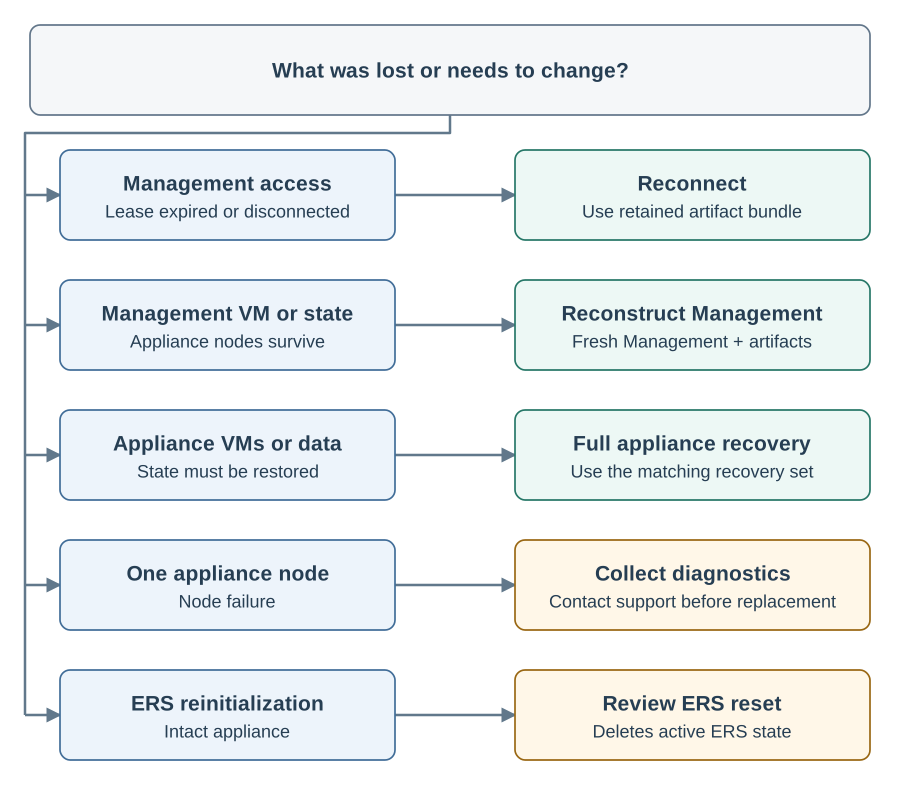
| Situation | Start here | Required material |
|---|---|---|
Management opens, but the Appliance is disconnected |
Reconnect the Appliance. Expired cluster access or a Management restart does not by itself stop the Appliance. |
The appliance’s artifact bundle and access to its network. |
Management or its state disk was lost; the Appliance survives |
Reconstruct Management and recover its configuration from the surviving Appliance. |
Fresh Management media and state disk, the artifact bundle, and a reachable Appliance. |
The Management administrator password was forgotten |
Reconstruct Management. The ISO console does not reset Management accounts. |
The same inputs as Management reconstruction. |
Appliance machines or their data were lost |
A full backup, matching artifact bundle, matching release bundle, its exact Management build, and replacement machines. |
|
One node failed |
Check the node’s hypervisor, power, disks, and network; collect diagnostics and contact support before replacement. |
Node name and failure time, topology, and retained recovery files. This manual does not define an individual-node replacement procedure. |
An update stopped or needs attention |
Preserve the recovery set and the displayed update state. See Updates and troubleshooting. |
The source recovery set and the exact source and target versions. |
ERS must be initialized again on an intact Appliance |
Review ERS reset. It removes active ERS data and configuration; it is not a backup restore. |
Approval to delete the current ERS data and configuration. |
Prepare before a Failure
Store completed full backups outside the Appliance. Retain the matching artifact and release bundles where they remain available after loss of Management and the Appliance. The artifact bundle contains private recovery keys; a full backup alone is insufficient.
Keep a record of the Appliance version, node names, application hostname, topology and external dependencies. Retain the exact Management image required by each release bundle. For an installed VM backup or restore, preserve its TPM and EFI state with its encrypted disks. A replacement machine requires application recovery from the protected backup; copying encrypted disks alone is insufficient. External HSM key recovery belongs to the HSM administrator.