Technology Choices
The Appliance runs ERS and its supporting services on Kubernetes. Management handles routine administration.
Here, cloud native describes how the software is packaged and managed. It does not mean the Appliance must run in a public cloud. The Appliance runs on your virtual machines, with locally supplied software and configuration. External connections depend on the services you configure.
Kubernetes Service Management
A container packages an application with the software it needs to run. Kubernetes coordinates containers across the Appliance nodes. It starts workloads, checks their readiness, connects services and attaches their storage. When a process fails, it can restart the workload; where topology and storage permit, it can schedule a replacement on another node.
For ERS and its supporting services, Kubernetes uses declared configuration and health checks to manage startup. Operators do not need to start each process by hand. The same management model supports a standalone Appliance and a deployment with three nodes. See the Kubernetes overview for these platform concepts.
Kubernetes also provides access controls and mechanisms for restricting workloads. Those controls need configuration. Running in a container does not automatically make a service secure. Its recovery mechanisms cannot repair lost storage or make a standalone Appliance redundant. The Appliance supplies the service configuration; operators protect its administrative interfaces and underlying infrastructure.
Talos on Appliance Nodes
Talos Linux is the operating system on the Appliance nodes. It is designed specifically for Kubernetes. It has no SSH server, interactive host shell or package manager and its system filesystem is immutable during normal operation. Node administration uses an API instead of interactive shell changes. These are Talos design properties.
This leaves fewer general-purpose services to maintain and fewer opportunities for undocumented changes. The supplied operating system image and machine configuration make installations more repeatable. Removing shell access also removes a common route for interactive compromise and persistent manual modifications.
Troubleshooting therefore uses Management, diagnostics and the Talos API. Administrators do not install utilities or patch individual packages on the nodes. Updates follow the Appliance release process. Talos still requires protected API credentials, a secure hypervisor and timely updates.
Talos runs on the Appliance nodes. Management can run in the Fedora CoreOS ISO VM (which has a host SSH interface), or in Docker on an operator-maintained host. Read Architecture and responsibilities before applying a host procedure.
Configuration History in Git
Desired state means the configuration the system should have. Reconciliation is the process of comparing that configuration with the running system and applying changes to bring them into agreement.
GitOps stores desired configuration in version-controlled files. Git records changes as commits, so an operator can inspect what changed and compare it with an earlier configuration. Management’s task pages create commits for supported settings; advanced operators can inspect the repository in Gitea, the Git service included in Management.
Treat repository access as an administrative privilege. Git history is not a tamper-proof audit archive and reverting a commit does not restore deleted application data.
Gitless GitOps Delivery
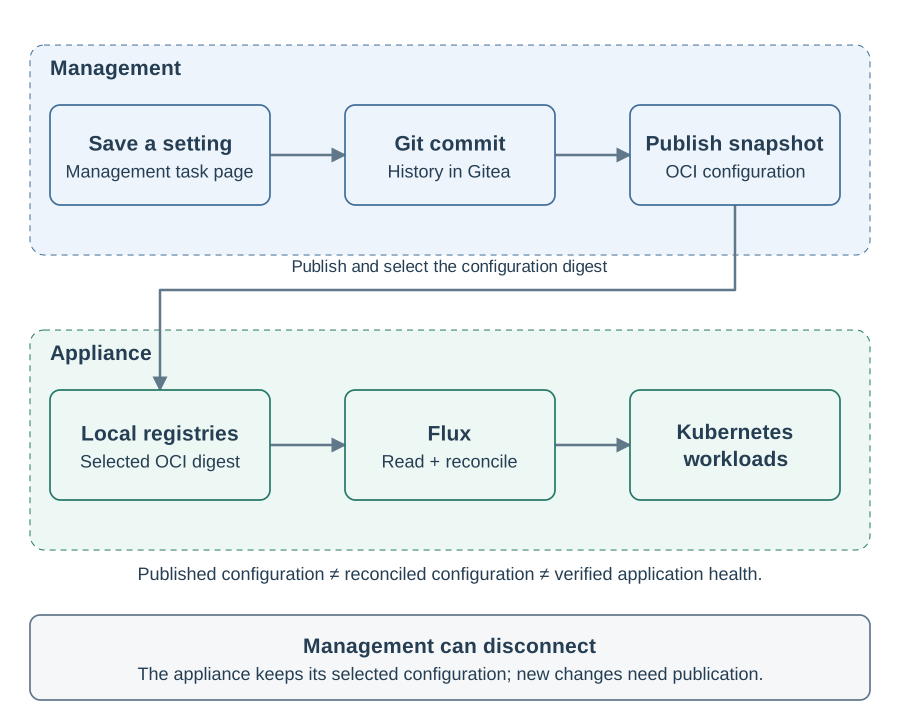
The Appliance uses Git for authoring and history, then delivers configuration as an OCI artifact. OCI is a packaging and distribution standard also used for container images. A registry stores those packages; each artifact has a content digest that identifies its exact bytes.
Configuration reaches the Appliance in these steps:
-
An operator saves a setting in Management, which records a Git commit in Gitea.
-
With active cluster access, Management packages and publishes the committed configuration to the Appliance’s local registries.
-
Management selects the published artifact for the Appliance.
-
Flux reads that artifact inside the Appliance and reconciles its configuration.
Gitless refers to this runtime delivery path. Flux does not need a live connection to the Management Git server to keep applying the selected local configuration. This fits restricted networks and allows the Appliance to continue operating when Management is disconnected. New configuration still needs publication and configured external dependencies must remain reachable.
A digest identifies content; it does not by itself prove who approved or produced it. Protect repository access, publication credentials and registry access. See Change Configuration and Secrets for the operator workflow.
How Flux applies Configuration
Flux is the reconciliation software running inside the Appliance. Its source controller retrieves the selected OCI artifact. Its other controllers apply Kubernetes configuration and manage packaged service deployments, including Helm releases. Helm is a format and toolset for packaging Kubernetes applications.
Flux repeatedly checks the selected configuration, applies changes and reports reconciliation status. Kubernetes then runs the resulting workloads.
Flux corrects differences between the declared configuration and the running system. It can overwrite direct edits to managed resources, so make permanent changes in the documented configuration files. Publication or reconciliation can succeed even when an application operation fails. Check live service health after a change. The Flux Concepts Guide explains reconciliation and OCI-based delivery.
Metrics, Logs and Dashboards
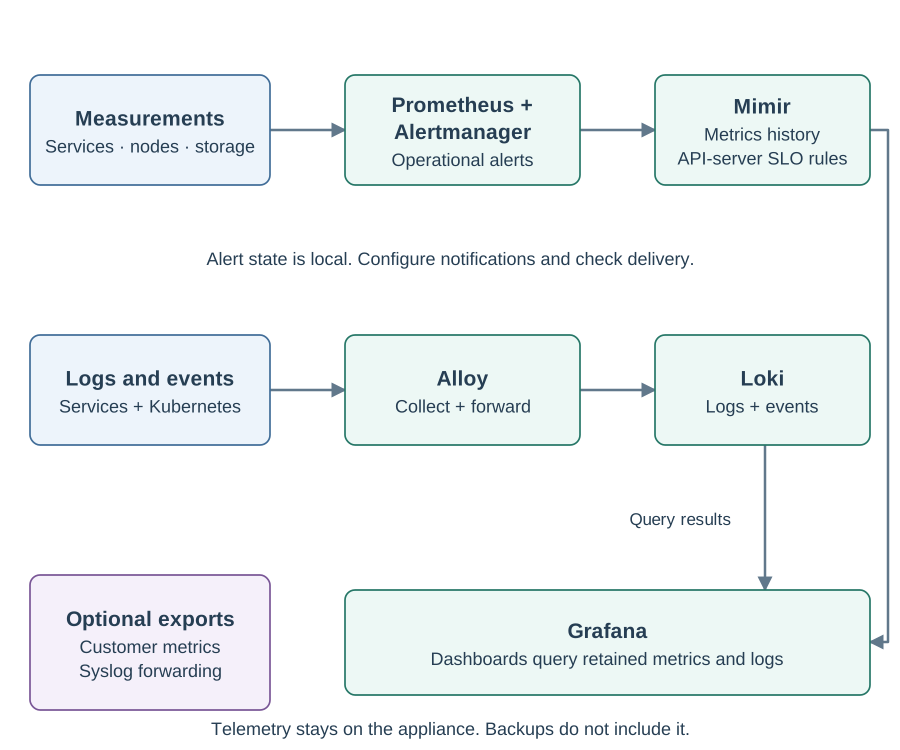
Observability means using measurements and records to understand system behavior. A metric is a numeric measurement over time, such as free disk space or failed requests. A log records an event and its context. Together they help distinguish an application failure from a storage, network or capacity problem.
| Component | Role in the Appliance |
|---|---|
Prometheus and Alertmanager |
Collect current metrics, evaluate alert rules and manage alert state. |
Grafana Mimir |
Retain metrics for historical queries and evaluate API-server SLO and error-budget rules against that history. |
Grafana Alloy and Loki |
Alloy collects and forwards logs and Kubernetes Events; Loki stores and searches them. |
Grafana |
Present dashboards and queries that combine health, metrics, logs and audit records. |
Garage |
Provide local object storage used by telemetry and backups. It is separate from the application database. |
The stack runs inside the Appliance. Operators can investigate locally and configure customer metrics or Syslog forwarding for their existing monitoring systems. For background, see the Mimir and Loki documentation.
Metrics and logs also help with security investigations. Logs can contain sensitive data, so restrict administrative access to Grafana. Check notification delivery separately from alert state. Keep independent copies of records needed as evidence. See Inspect Health, Logs and Audits for collection, retention and audit limitations.
Application Data in MariaDB
MariaDB is the relational database for ERS and its identity service. A relational database organizes data into tables and uses transactions to group related changes so they succeed or fail together. This supports applications that must maintain consistent records while serving concurrent requests.
The Appliance uses the MariaDB operator, a Kubernetes controller that manages the database from its declared configuration. Application databases and accounts are separate and the database uses its dedicated disk. Database operation, health checks and backup capture use the Appliance’s Kubernetes configuration.
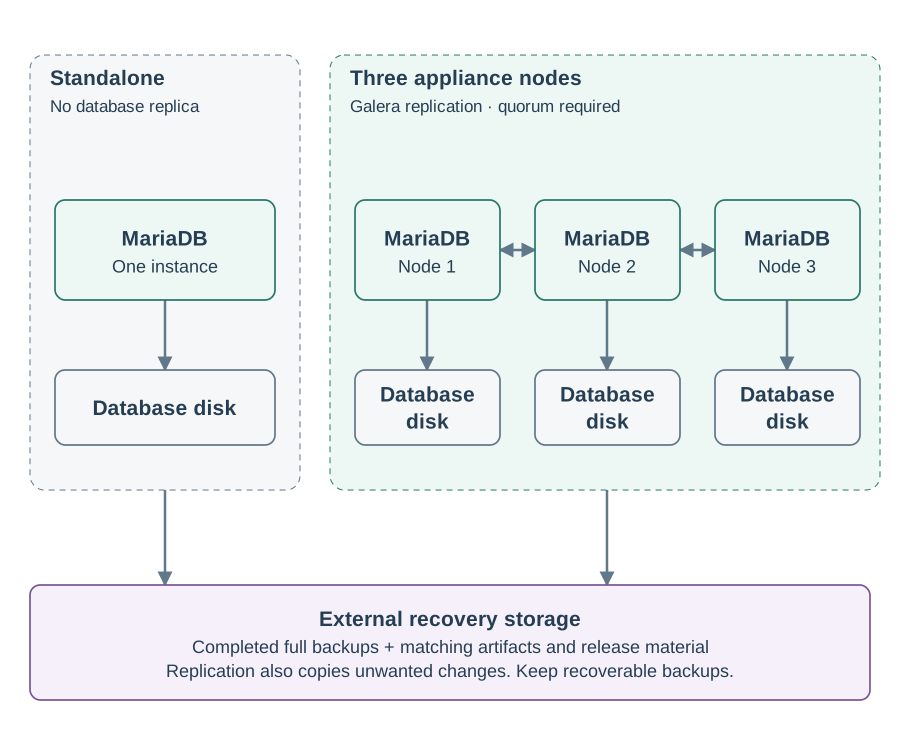
Standalone deployments run one database instance and have no database replica. Three-node deployments use three MariaDB members with Galera replication, placed on separate Appliance nodes. Galera coordinates transactions across members and uses quorum to avoid separate groups accepting conflicting writes during a network partition. See Galera architecture.
Replication improves availability when the required members and infrastructure remain healthy. It also copies unwanted changes, so it cannot replace backups. Database ports and administrator credentials belong inside the protected Appliance environment. Use the Appliance backup workflow and retain the full recovery set outside the Appliance.
Protect the complete Deployment
Protect network access, administrator accounts and the hypervisor and keep recoverable backups. See Security and Hardening for the built-in protections and operator actions.