|
For the latest version, please use Virtual Appliance 1.0.3! |
Architecture
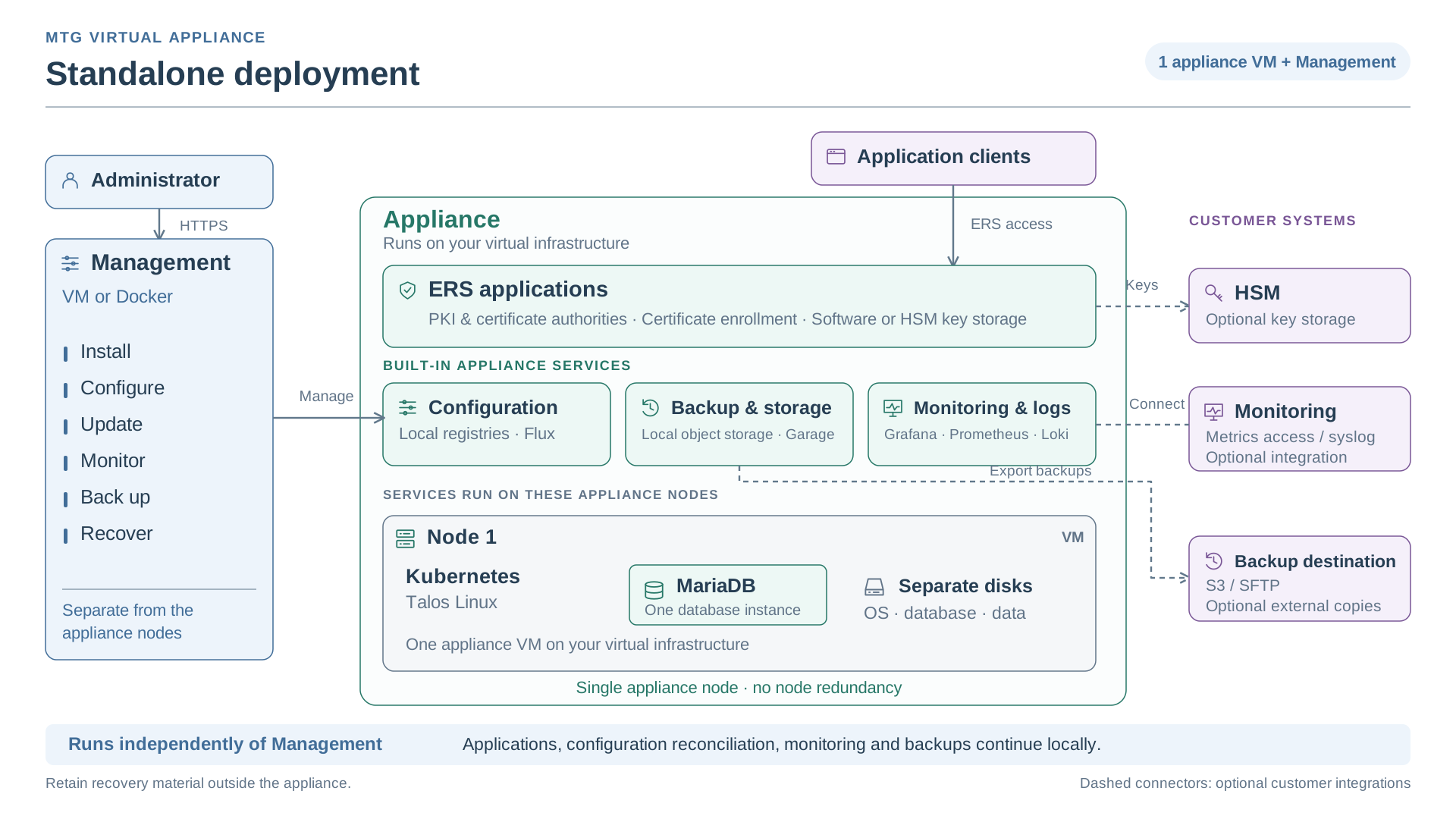
The MTG Virtual Appliance consists of Management and the appliance nodes that run Enterprise Resource Security (ERS). Management installs and administers one appliance deployment. Initialize ERS after installing the appliance.
See Technology Choices for how the platform components work and Security and Hardening for built-in protections and operator responsibilities.
image::ROOT:diagrams/three-node-deployment.svg["Three appliance nodes run Kubernetes, Talos and replicated MariaDB databases. Management is separate, application clients access ERS and HSM, monitoring and external backup integrations are optional.",link=self]
Components and Responsibilities
| Component | Purpose | Operator entry point |
|---|---|---|
Management host |
Runs Management using the supplied Fedora CoreOS ISO or Docker on an operator-maintained host. Provides persistent storage, networking, time synchronization and HTTPS configuration. |
ISO: hypervisor console and host SSH. Container: operator host and container-runtime commands. |
Management application |
Provides installation, configuration, updates, backups, recovery and diagnostics. It runs its own services inside the Management container in either deployment option. |
Management HTTPS URL and Management administrator sign-in. |
Appliance nodes |
Run Talos Linux, Kubernetes, appliance services and the ERS workload. Their system, database and data disks are separate from Management storage. |
Management; the generated administrative access material for advanced operations. |
ERS |
Provides the configured MTG application services and PKI. ERS interfaces, HSM connections and application credentials have their own configuration. |
ERS setup in Management, then the configured application endpoints. |
Choose Docker Compose on an operator workstation or operator-created VM,
or the Management ISO VM.
Both provide the same application. For containers, retain the volume mounted at /var and the TLS directory.
For the ISO option, the Management ISO remains attached and first in its VM’s boot order. The Management state disk contains persistent data, not an installed operating system. Each boot starts the Management software embedded in the attached ISO and reuses valid state.
Appliance nodes follow a different lifecycle. They first boot the matching Talos artifact into maintenance mode. Management discovers them, asks you to approve their identities and disks and installs the appliance onto those disks. Give their intended OS disk first boot priority.
Topology
The installation wizard offers Standalone and Three nodes. Standalone has one appliance node and no node redundancy. Three nodes uses three control-plane nodes. Keep Management separate from the selected appliance nodes; it does not count as an appliance node.
Choose the deployment profile agreed for your workload and release. Three nodes can still fail together if they share hypervisor storage, networking or a site. See Hardware requirements for capacity planning.
Network Identities
Keep these identities distinct when planning DNS, routing and certificates:
-
The Management hostname and HTTPS port identify the Management web application. The host’s IP address and its private internal node address are separate settings.
-
Each appliance node has its own name and IPv4 address. Management derives administrative connections from these addresses.
-
The application load-balancer address and application hostname expose ERS.
-
Kubernetes API connections use node IPs on port
6443. Initial configuration uses the first node; Management retains all node addresses and selects a reachable authenticated node when establishing access. -
Talos API access uses the appliance node addresses. It is separate from the Kubernetes API endpoint.
Use Firewall requirements to plan the connections between operator workstations, Management, appliance nodes and external services.
Configuration and Connectivity
Management publishes the appliance’s desired configuration through GitOps. The appliance reconciles that configuration into running services. After saving or publishing configuration, check the affected workloads in the task and health views. Saving or publication alone does not confirm their health.
Management’s sign-in session and its connection to the appliance are separate. Management retains the uploaded artifact bundle in memory for a six-hour cluster access lease. During that lease, it opens authenticated external access to the Kubernetes API and node registries. When the lease expires, Management removes its retained copy and attempts to close those external paths. The appliance can continue running while Management is disconnected; Talos remains the authenticated control path between leases.
Keep administrative endpoints restricted to approved sources through your network firewall. Lease expiry does not revoke credentials in downloaded artifact bundles. After expiry or Management restart, reconnect using the retained artifact bundle. The reconnection guide also explains renewal and what to do if firewall closure is unconfirmed.
Installation and Recovery Material
The Management ISO or container image starts Management. A release bundle installs one appliance release and the matching Talos boot artifact starts the target nodes. These are separate inputs.
Installation produces a sensitive artifact bundle containing administrative access and configuration. Retain it outside Management. A backup bundle captures appliance state for recovery; it does not replace the artifact bundle. Losing Management and losing appliance data require different recovery procedures.
See Bundle Types, Recovery Options and First Deployment.